


Golf GPS App: Free Distances on 40,000+ Courses
TheGrint is a free golf GPS app with front, center and back green distances on 40,000+ courses worldwide, plus distance arcs, hole notes and a manual shot tracker. A Pro Membership adds Target Dispersion, Strategic GPS Points, unlimited Green Maps and connected Swingman rangefinder data.
Last reviewed:
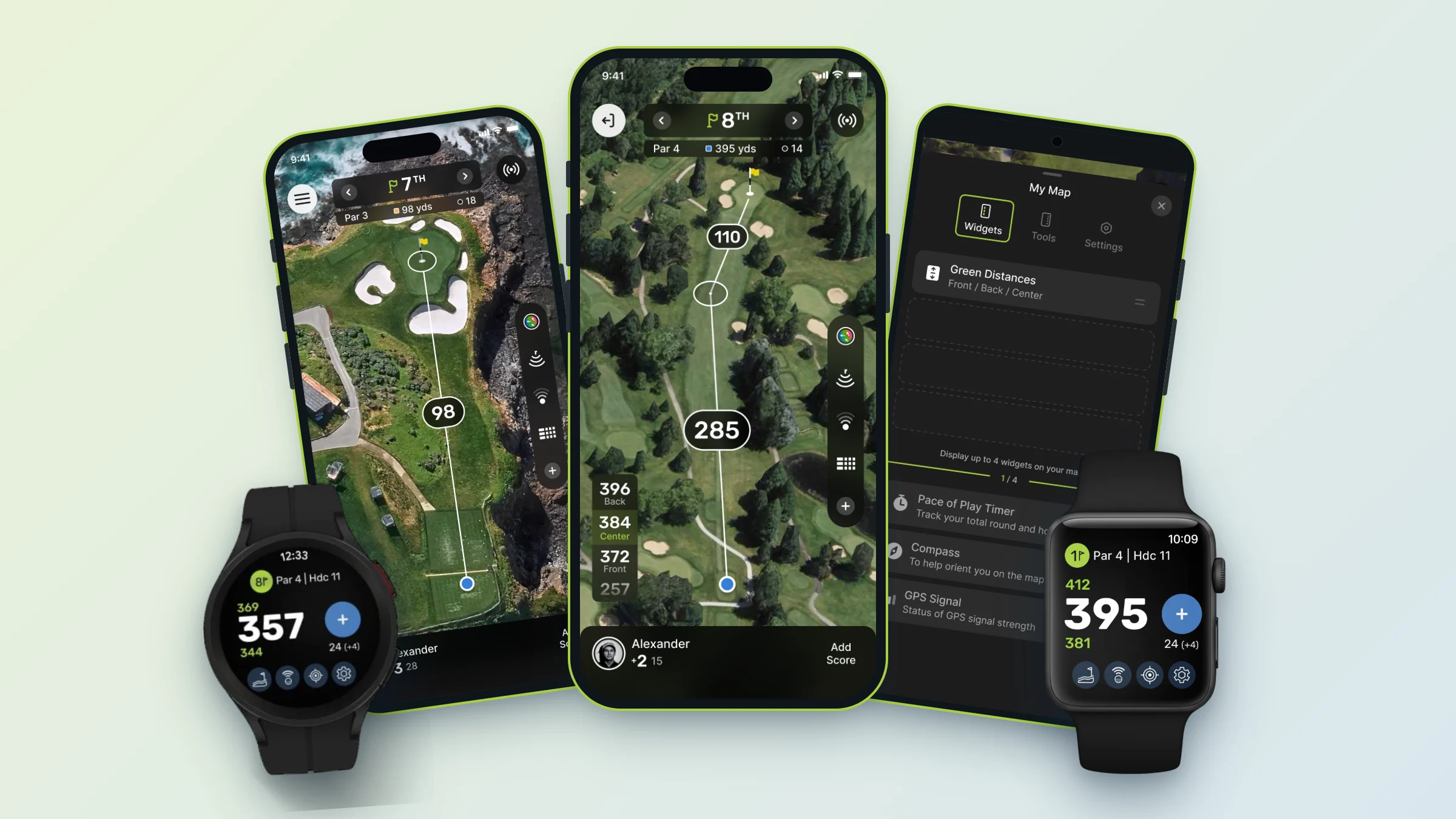
- Courses: GPS maps on 40,000+ courses worldwide.
- Free: front, center and back distances, distance arcs, hole notes and a manual shot tracker on the phone.
- Pro: Target Dispersion, Strategic GPS Points and unlimited Green Maps.
- Your layout: choose your widgets and tools, small or large widgets, and map auto-zoom.
- Scoring built in: keep score for up to four players from the GPS screen.
- Want more? Try TheGrint Pro free for 7 days.
Front, center and back distances on every hole
TheGrint GPS shows distances to the front, center and back of the green on 40,000+ courses, free. TheGrint has offered GPS course maps for more than 10 years. Widgets stay on screen while you play: green distances, a pace of play timer, a compass and GPS signal. Pro members also get Strategic GPS Points, which add many more distance markers to the hole.
Tools you open when you need them
Open tools as you need them: distance arcs at 100, 150, 200 and 250 yards, the Shot Tracker, Green Maps, Target Dispersion, Green Depth, Hole Notes, the camera, games and leaderboards. Your scorecard is part of the GPS too, so you can keep score for up to four players without leaving the map.
Make the GPS yours
Choose which widgets and tools appear, switch to large widgets if you want bigger numbers on the course, and turn on Auto-zoom so the map moves from the tee-shot view to a closer approach view as you play the hole. Your GPS settings carry over to your next round.
Hole Notes from other golfers
Save a private note for yourself on any hole, or post a public note other Grinters can see. Public notes can be upvoted and pinned, so you can read what other golfers learned about an unfamiliar hole before you hit.
Track shots manually
Mark where a shot starts and where it ends, and TheGrint shows it on the map and adds it to your shot-distance stats. Shot tracking is manual: you start and finish each shot yourself. It's free on the phone; on a smartwatch it's part of Pro.
Swingman rangefinder + TheGrint (Pro)
Swingman laser rangefinders can connect to TheGrint and use its course data. With Pro, a connected Swingman shows front, center and back distances and your relative pin location. Slope measurement is a feature of the rangefinder hardware. TheGrint's app GPS does not give plays-like, wind-adjusted or elevation-adjusted distances.
Shop the Swingman Autograph rangefinder on TheGrint Shop. Pro members get 15% off in the Pro Members Only Shop.
Playing with a watch? See the Apple Watch & Wear OS golf app.
Target Dispersion
Plan smarter aimpoints with Target Dispersion (Pro)
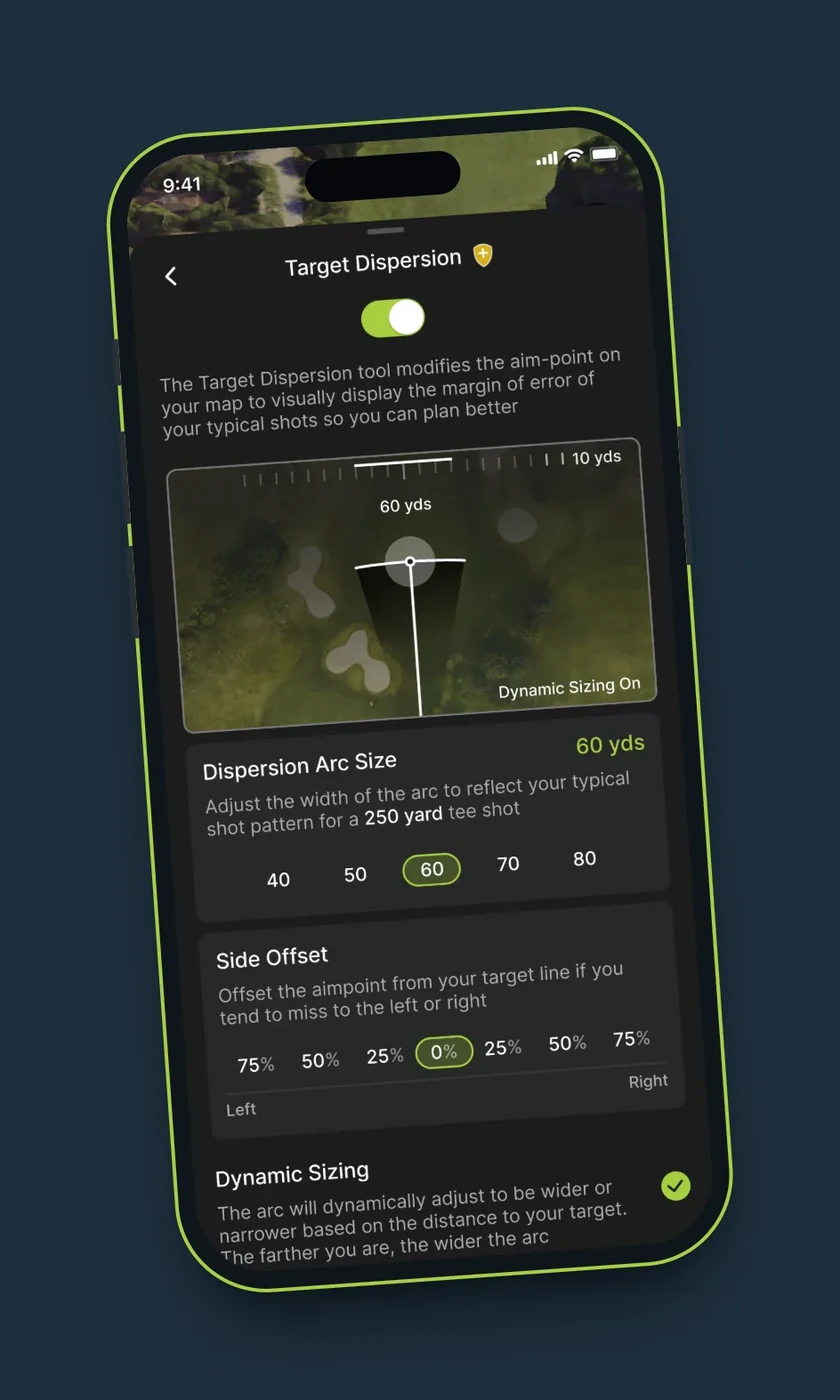
Target Dispersion swaps the standard circular aimpoint for a dispersion arc you set yourself, so you can see how your usual miss fits the hole before you swing.
- Set your dispersion width
- Add a draw or fade bias
- Toggle between the arc and the standard aimpoint
Target Dispersion is a planning tool. It doesn't pick a club or adjust for wind or elevation.
How to start a round with GPS
- Tap Play. TheGrint picks the closest course; change it if you need to.
- Choose your tee and a 9-hole or 18-hole round.
- Add players and games if you want them, then start the round.
- The GPS opens on hole 1 with your distances and scorecard.
How to turn on Target Dispersion (Pro)
- Tap the + button on the GPS.
- Enable Target Dispersion. Its icon is added to the GPS screen.
- Tap the icon to switch between the arc and the standard aimpoint.
- Adjust width and bias from the Settings tab in the GPS.
Free vs Pro: GPS
| GPS feature | Free | Pro |
|---|---|---|
| GPS maps and front, center, back distances | ✓ | ✓ |
| Distance arcs, Hole Notes, Green Depth | ✓ | ✓ |
| Manual Shot Tracker on the phone | ✓ | ✓ |
| GPS distances on your watch | ✓ | ✓ |
| Strategic GPS Points | – | ✓ |
| Target Dispersion | – | ✓ |
| Green Maps | 3 trial views | Unlimited |
| Connected Swingman distances and relative pin location | – | ✓ |
Pro comes with a 7-day free trial.
Golf GPS app FAQ
Is TheGrint's golf GPS free?
Yes. GPS maps and front, center and back distances are free on 40,000+ courses. Pro adds Target Dispersion, Strategic GPS Points, unlimited Green Maps and connected Swingman data.
How many courses does TheGrint GPS cover?
TheGrint GPS covers 40,000+ courses worldwide.
Does TheGrint give plays-like or slope-adjusted distances?
No. TheGrint's app GPS does not adjust for wind, elevation or slope. Swingman rangefinders can measure slope, but that is a feature of the rangefinder hardware.
Can I use TheGrint GPS on my watch?
Yes. GPS distances are free on Apple Watch Series 4 or newer and on Android watches running Wear OS.
What is Target Dispersion?
Target Dispersion is a Pro GPS tool that replaces the circular aimpoint with a dispersion arc you set, with your own width and draw or fade bias, to help you plan an aimpoint.
Does TheGrint track my shots automatically?
No. The Shot Tracker is manual: you mark the start and end of each shot yourself.


